How to Withdraw Money from Poppo / Vone
The Sunday System, Payment Methods, and Why First Withdrawals Fail
Table of Contents
"You earned 100,000 points. You go to withdraw. It fails. You try again. It fails again. The reason is almost always the same — and completely avoidable."
Most first withdrawals fail because hosts don't understand the Sunday deadline, the Pcoins + Points formula, or the 5 requirements. This guide covers every detail.
5 Requirements to Withdraw
| Requirement | Details | Status Check |
|---|---|---|
| Verified Account | Face authentication completed and approved | Profile → Verified badge |
| Minimum Points | 100,000 combined (Pcoins + Points) = $10 | Wallet → Total balance |
| Payment Method | Epay, USDT, PayPal, or bank configured | Settings → Payment |
| Sunday Deadline | Submit before Sunday 23:59 UTC+8 | Monday 1:29 AM IST cutoff |
| No Active Violation | Account not flagged or restricted | Check notifications |
Pcoins + Points Formula
Example: 30,000 Pcoins + 70,000 Points = 100,000 ÷ 10,000 = $10
| Pcoins | Points | Total | Withdrawal $ | Withdrawal ₹ |
|---|---|---|---|---|
| 0 | 100,000 | 100,000 | $10 | ₹830 |
| 30,000 | 70,000 | 100,000 | $10 | ₹830 |
| 50,000 | 150,000 | 200,000 | $20 | ₹1,660 |
| 100,000 | 400,000 | 500,000 | $50 | ₹4,150 |
| 0 | 1,000,000 | 1,000,000 | $100 | ₹8,300 |
Sunday System
Weekly cycle: You can only submit one withdrawal request per week. The processing window opens after each Sunday deadline.
Processing times: After submission, funds arrive in 1–7 business days depending on your payment method.
Step-by-Step Withdrawal
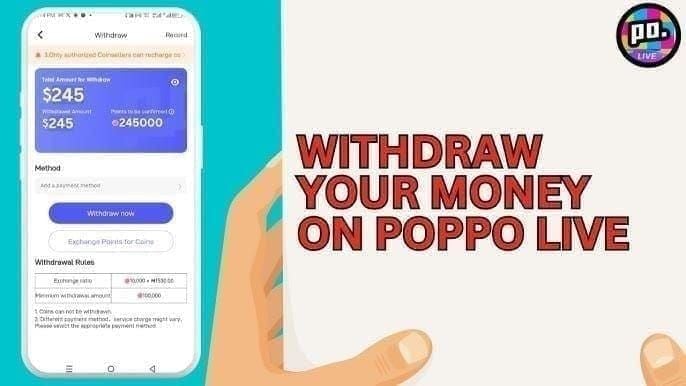
- Open Vone/Poppo → Profile → Wallet
- Check your total balance — Pcoins + Points must equal 100,000+ for first withdrawal
- Tap "Withdraw" — select amount (must be $10 or multiple)
- Select payment method — Epay, USDT, PayPal, or bank
- Enter payment details — account number, email, or wallet address
- Confirm withdrawal — review all details before submitting
- Wait for processing — 1–7 business days depending on method
Payment Methods for India
| Method | Processing Time | Fees | Best For |
|---|---|---|---|
| Epay | 1–3 days | Low | Recommended for India — fastest |
| USDT (crypto) | 1–3 days | Network fees | If you have crypto wallet |
| PayPal | 3–5 days | Standard PayPal fees | International payments |
| Bank Transfer | 3–7 days | Bank charges apply | Direct to Indian bank account |
Withdrawal Math
| Scenario | Points | USD | ₹ (approx) |
|---|---|---|---|
| Minimum withdrawal | 100,000 | $10 | ₹830 |
| Month 1 (tasks only) | 300,000 | $30 | ₹2,490 |
| Month 2 (tasks + gifts) | 500,000 | $50 | ₹4,150 |
| Month 3 (active host) | 1,000,000 | $100 | ₹8,300 |
| Top host (6+ months) | 5,000,000+ | $500+ | ₹41,500+ |
7 Failure Reasons and Fixes
❌ Face authentication not completed
✅ Complete face scan in Profile → Verification. Approval takes 30 min to 48 hours.
❌ Below 100,000 points minimum
✅ Wait until Pcoins + Points = 100,000+. Nothing is lost — they carry forward.
❌ Missed Sunday deadline
✅ Set a recurring alarm for Sunday 11 PM IST. Submit before Monday 1:29 AM IST.
❌ Payment method not configured
✅ Go to Settings → Payment → add your Epay/PayPal/bank details before withdrawing.
❌ Wrong payment details entered
✅ Double-check account number, email, or wallet address. Wrong details = funds lost.
❌ Account flagged for violation
✅ Check notifications for any violations. Contact BarbieVerse support for resolution.
❌ Trying to withdraw partial amount
✅ Withdrawals must be in $10 multiples. 95,000 points = cannot withdraw. Wait for 100,000.
Fastest Route to Withdrawal
BarbieVerse Withdrawal Support
| Service | What You Get |
|---|---|
| Deadline reminders | WhatsApp alerts before every Sunday cutoff |
| Payment setup help | Step-by-step Epay/PayPal configuration |
| Failure troubleshooting | Hindi + English support for withdrawal issues |
| Document guidance | Help with verification documents |
5 Mistakes That Delay Your Money
❌ Not setting up payment method early
✅ Configure Epay/PayPal in Week 1. Don't wait until you have 100,000 points.
❌ Missing the Sunday deadline
✅ Set a recurring alarm for Sunday 11 PM IST. The deadline is Monday 1:29 AM IST.
❌ Entering wrong payment details
✅ Triple-check account number, email, or wallet address. Wrong details = funds lost permanently.
❌ Withdrawing below $10
✅ 100,000 points minimum. 99,999 = cannot withdraw. Wait one more day.
❌ Not completing face authentication
✅ First withdrawal requires verified identity. Complete it in Week 1, not Week 3.
Frequently Asked Questions
Start Your Creator Journey
Join BarbieVerse and get beginner-friendly guidance on setup, verification, and your first livestream.
Free to join · No hidden fees · Hindi + English support